

How to Adjust an AI Tennis Ball Machine Without Walking Back Between Feeds
Walking from the baseline to a tennis ball machine after every small change can break the rhythm of solo practice. The interruption is not only physical. You also have to remember what felt wrong, change a setting, return to position, and rebuild the timing of the drill.
Remote control can shorten that loop. A phone app is useful for detailed setup and larger changes, while wristband voice control can support selected adjustments from the practice position. The goal is not to change settings constantly. It is to make a necessary change without turning each drill into a trip across the court.
Remote Adjustment Should Protect the Drill
The value of remote control is easier to understand when you separate setup from active practice. Some decisions belong before the first ball. Others become clear only after you have hit a short set.
Build the Drill Before You Start
Use the initial setup to choose the training goal, court position, placement, pace, spin, height, interval, and pattern that fit the session. Test a small number of balls before taking your full starting position. A remote interface does not remove the need to position the machine correctly, confirm a safe court, and follow the current operating instructions.
Change Only What the Last Set Revealed
After a short block, identify the one condition that needs attention. If the next ball arrives before recovery is complete, lengthen the interval. If contact is consistently late, reduce pace or simplify placement. If the feed is comfortable but the task is too easy, add one controlled movement demand. Remote control works best when the adjustment answers a specific observation.
Keep Major Edits Separate From Live Feeding
Pause the feed before making a meaningful change. A new drill, wider placement pattern, or different combination of pace and spin deserves a fresh test rather than an on-the-fly guess. Staying at the baseline does not mean operating the machine while distracted or while a ball is already moving toward you.
Choose the Right Control Method for the Job
App control, wristband voice control, and direct machine controls are not interchangeable in every situation. Each method fits a different part of the workflow.
| Control Method | Best Use | Practical Boundary |
|---|---|---|
| Phone app | Detailed drill setup, parameter changes, and saved training patterns | Pause and focus on the screen before making complex edits |
| Wristband voice control | Supported adjustments from the baseline during a safe break | Use only current supported commands and confirm the change |
| Controls at the machine | Initial setup, physical checks, and recovery when remote control is unavailable | Stop feeding before approaching the machine |
A remote interface should simplify a good training plan, not encourage constant experimentation. Players comparing control styles with other automation levels can review how an automatic tennis ball machine differs from a programmed or adaptive system.
Use the App for Detailed Setup and Larger Changes
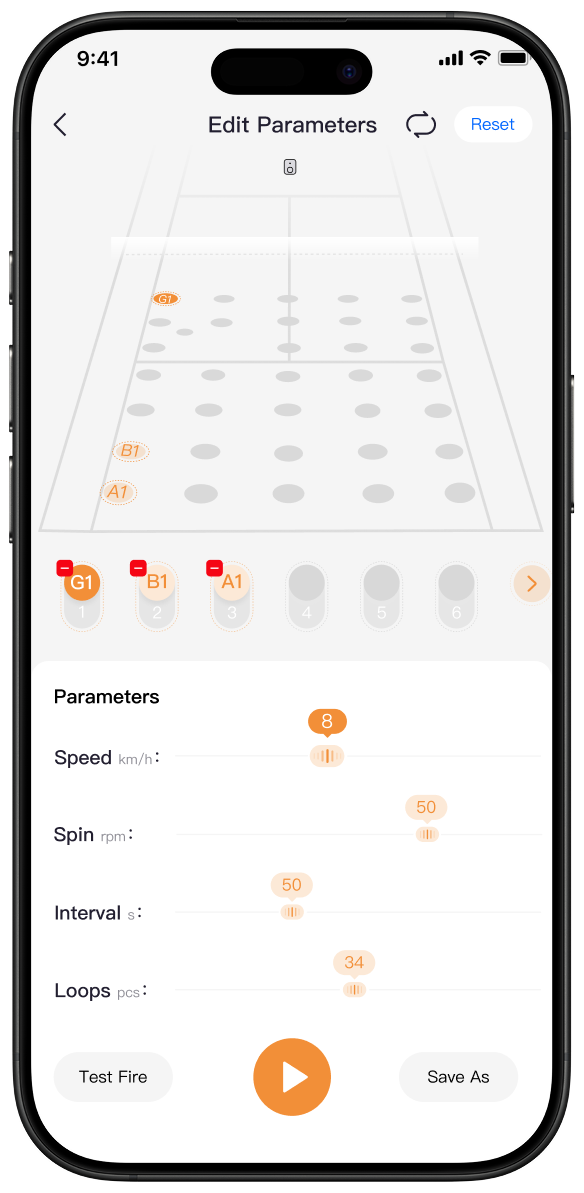
The app is the clearer choice when you need to see several settings together, choose a drill, or organize a more detailed pattern. It gives the session a defined structure before the repetitions begin.
Start With a Conservative First Version
Set the first version below the highest difficulty you expect to use. Choose a manageable location and enough time to prepare, hit, and recover. Run a brief test, then move to the baseline and complete a short block. Starting conservatively gives you useful information; starting too hard often produces several problems at once.
Adjust One Field at a Time
If a drill needs improvement, change one meaningful variable and repeat the same number of balls. This makes the effect visible. Increasing speed, widening placement, shortening the interval, and changing spin together may feel advanced, but it hides which adjustment caused the drill to improve or collapse.
Save Routines You Will Actually Repeat
A saved pattern is useful when it represents a real weekly practice block. Name or organize routines around the task鈥攃ontrolled crosscourt contact, two-point recovery, approach and first volley鈥攔ather than creating many slight variations you cannot remember. The same principle applies when planning AI tennis ball machine drills: begin with a clear outcome, then add movement or uncertainty only when it serves that outcome.
Use Wristband Voice Control for Short In-Session Adjustments
Wristband voice control is most useful when the drill is already built and you need a supported adjustment without carrying a phone through every repetition. It can reduce unnecessary walks while helping you remain near the position where the training problem occurred.

Make the Change During a Deliberate Pause
Finish the ball, recover, and pause the session before speaking a command. Face the court and keep the machine in view when practical. Voice control is hands-free, but it is not attention-free; you still need to confirm that the court is clear and that the intended adjustment was accepted before resuming.
Use the Current Supported Command Set
Do not assume that every app setting has a matching voice command. Use only the command wording and functions shown in the current product instructions. If the requested change is detailed, unfamiliar, or not clearly confirmed, use the app or the controls at the machine instead of repeating guesses from the baseline.
Keep the Phone Available for Detailed Work
The wristband can reduce handling during active practice, but the app remains useful for larger edits, saved drills, and a clearer view of several parameters. A practical routine is to prepare the block in the app, use wristband voice control for supported in-session changes, and return to the app between blocks when the training goal changes.
How TERO Pro Supports a Baseline-to-Baseline Workflow
TERO Pro combines remote session control with vision-based adaptive practice. Those functions solve different problems: control changes how you manage the session, while visual perception changes how the system can respond as an exchange develops.

The TERO Pro AI tennis ball machine supports App and wristband voice control, allowing players to adjust the session from the baseline and reduce repeated walks back to the machine. The safest benefit is a shorter feedback loop: hit a small set, identify one problem, pause, make a supported change, confirm it, and begin again.
TERO Pro also uses a 4K dual-lens vision system positioned at handle height, with a 120-degree field of view. It analyzes ball speed, trajectory, and landing position in real time, plans a return within 0.1 seconds, and continues adjusting its response as the ball moves. That adaptive behavior can support a less scripted rally, but remote controls should still be used to define the purpose and difficulty of the session.
TERO Pro offers 35 selectable placements and speeds up to 87 mph. These ranges create many possible sessions, but they make disciplined control more important, not less. Choose settings that preserve preparation and recovery. Maximum speed and widest placement are options, not default training goals.
A Simple Remote-Control Practice Workflow
The following structure keeps adjustments connected to evidence from the previous set. It also prevents the app or wristband from becoming the main event.
- Prepare: Position the machine, clear the court, connect the supported controls, and select a manageable starting drill.
- Test: Run a small number of balls and confirm placement, pace, interval, and safe recovery space.
- Practice: Complete a short set with one success measure, such as target depth or recovery before the next ball.
- Pause: Stop feeding and identify the single condition that most affected the result.
- Adjust: Use the app for a detailed change or wristband voice control for a supported in-session adjustment.
- Confirm: Verify the new setting with another short test before returning to a full block.
For example, begin with ten controlled crosscourt feeds. If contact is balanced but recovery is late, lengthen the interval without changing the placement. Repeat the block. If recovery improves, add a second location while keeping the new interval. Each adjustment has a reason, and each new set shows whether it worked.
Common Remote-Control Mistakes
Convenient control can improve session flow, but it can also make unnecessary changes too easy. Avoid the habits below.
Changing Settings After Every Miss
One miss does not prove that the feed is wrong. Complete a small set and look for a repeated pattern before changing the machine. Otherwise, normal variation in your own timing can lead to a session that never stays consistent long enough to teach anything.
Watching the Screen Instead of the Court
Move to a safe position and pause the feed before using the app. Do not divide attention between a settings screen and an active ball. Reduce notifications and other distractions when practical so the phone remains a training control rather than a general interruption.
Assuming a Command Worked
Confirm the machine's current state before restarting. If the response is unclear, do not continue at the expected new setting. Use the current operating instructions, reconnect through the supported process, or make the change directly only after feeding has stopped.
Confusing Remote Control With Full Autonomy
Remote adjustment does not mean the machine chooses the right drill for every technical problem. The player or coach still defines the goal, observes the result, and decides whether the next set should become easier, harder, or simply more consistent.
Conclusion
The best way to adjust an AI tennis ball machine remotely is to separate detailed setup from short in-session changes. Use the app to build and revise the drill, use wristband voice control for supported adjustments during a safe pause, and confirm every change before restarting. This keeps the feedback loop short without making controls the center of the workout.
TERO Pro can reduce repeated walks between the baseline and the machine through App and wristband voice control, while its vision system supports more adaptive rally practice. The useful result is not constant adjustment. It is a session that stays focused because the right change can be made at the right time.
Frequently Asked Questions
Can a Coach Use Remote Controls While Working With a Player?
Yes, remote controls can help a coach pause or adjust a supported setting without repeatedly crossing the court. The coach should still maintain clear supervision, keep players outside the feed path during changes, and confirm the setting before restarting.
Do You Need to Change Settings During Every Ball Machine Drill?
No. Most drills benefit from stable settings long enough to reveal a consistent pattern. Make a change only when repeated results show that the pace, placement, interval, or difficulty no longer supports the training goal.
Can Remote Control Make a Poorly Designed Drill More Effective?
Not by itself. Remote control can make adjustments more convenient, but the drill still needs a clear goal, suitable difficulty, and a way to judge whether the change improved the player's response.
